
If you are looking for the absolute most secure and profitable Binance Futures Trading Guide, you have landed on the right page. As the world’s largest cryptocurrency exchange by trading volume, Binance offers an incredibly robust platform for trading crypto derivatives.
Trading futures allows you to maximize your capital efficiency and profit from both rising and falling markets. However, without a proper strategy, leverage can be highly dangerous. This step-by-step Binance Futures Trading Guide will teach you exactly how to navigate the interface, manage risk, and execute trades like a professional.
🎁 Exclusive Offer: If you don’t have an account yet, sign up via our official [Binance Registration Link] to claim your exclusive welcome trading bonus and get an instant 20% discount on all trading fees for life!
Why Choose Binance for Crypto Futures?
Binance is widely recognized as the gold standard for crypto derivatives trading. Its unmatched infrastructure guarantees that your trades are executed instantly without painful lags, even during periods of massive market liquidation.
Key Features of Binance Derivatives Market
| Feature | Advantage for Traders |
| Deepest Liquidity | Lowest slippage in the entire industry for BTC and altcoins. |
| USD-M & COIN-M | Trade using USDT/USDC stablecoins or the underlying crypto assets. |
| Multi-Asset Mode | Share margins across different crypto assets to maximize efficiency. |
| Top-Tier Security | Backed by the SAFU fund (Secure Asset Fund for Users). |
Step 1: Funding Your Binance Futures Wallet
Before you can open any leveraged positions, you must move your trading capital into the dedicated futures wallet.
- Log In or Sign Up: Securely log in to your Binance dashboard. If you need to create a new account, use this [Binance Registration Link] to activate your maximum fee discount before funding your wallet.
- Go to Dashboard: Click on “Wallet” in the top navigation bar and select “Futures”.
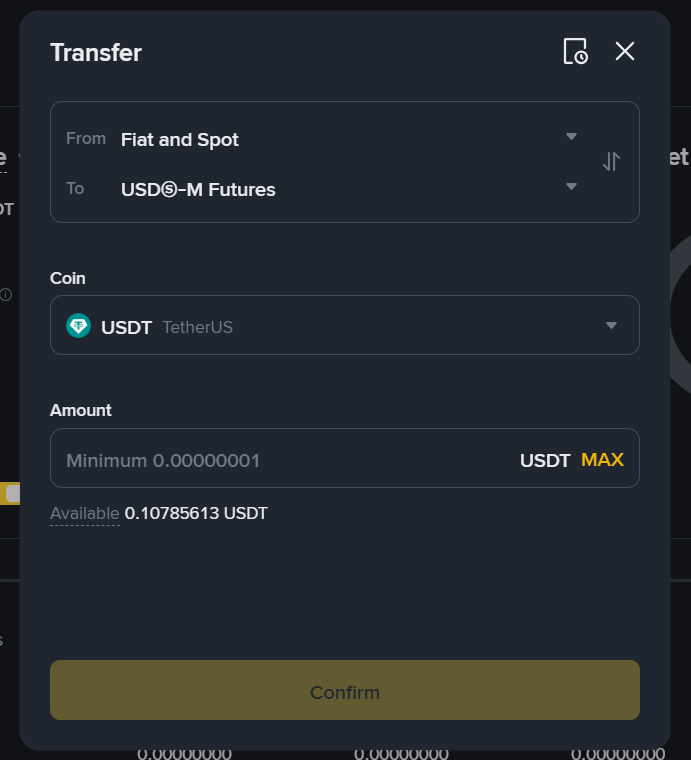
- Transfer Capital: Click the [Transfer] button. Move your USDT or USDC from your “Fiat and Spot” wallet into your “USDS-M Futures” wallet. Internal transfers on Binance are completely free and instantaneous.
Step 2: Choosing Your Margin Mode: Cross vs. Isolated
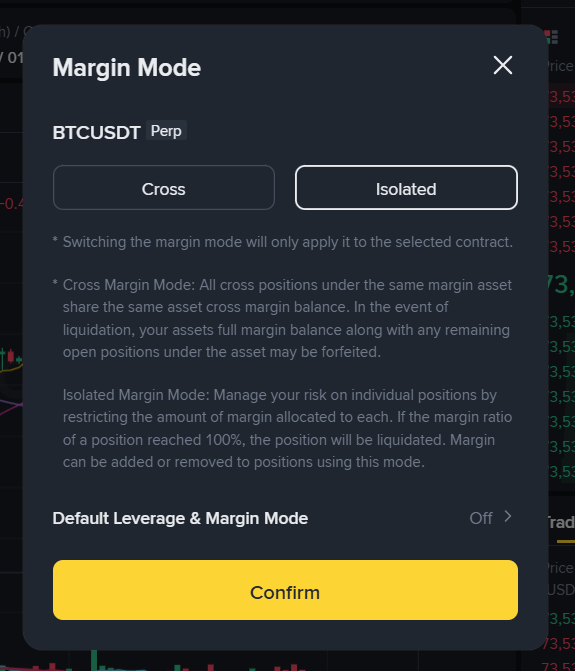
Once your wallet is funded, hover over the “Derivatives” menu at the top and select “USD-M Futures”. Choose your preferred trading pair (e.g., BTCUSDT). On the right-hand side of the screen, your very first task is to select your margin mode. This is a critical step in this Binance Futures Trading Guide.
- Cross Margin: Your positions share the entire crypto balance in your futures wallet. If a trade goes horribly wrong, your whole futures balance can be liquidated to keep the position open.
- Isolated Margin: Margin is strictly allocated to an individual position. If the trade hits its liquidation price, only the specific funds assigned to that trade are lost. For beginners following this Binance Futures Trading Guide, we heavily emphasize using Isolated Margin to preserve your capital.
Step 3: Setting Leverage and Managing Risk
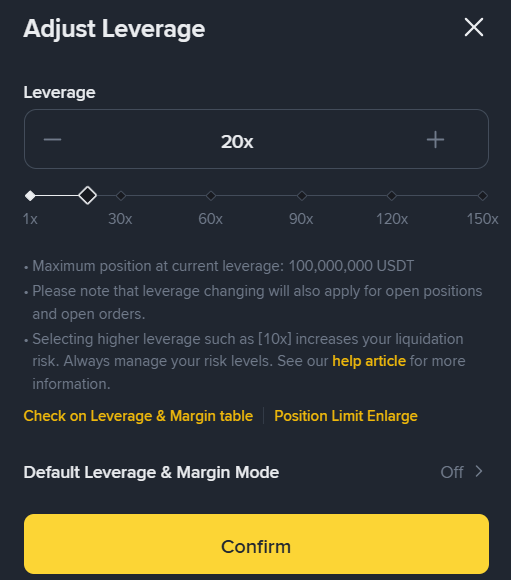
Leverage allows you to multiply your purchasing power. If you apply 10x leverage, a $100 margin allows you to control a $1,000 position.
While Binance supports up to 125x leverage on major crypto pairs, using excessive leverage is the fastest way to get wiped out. For sustainable profits, keep your leverage strictly between 3x and 5x. Never risk more than you can afford to lose.
Step 4: Placing a Long vs. Short Position
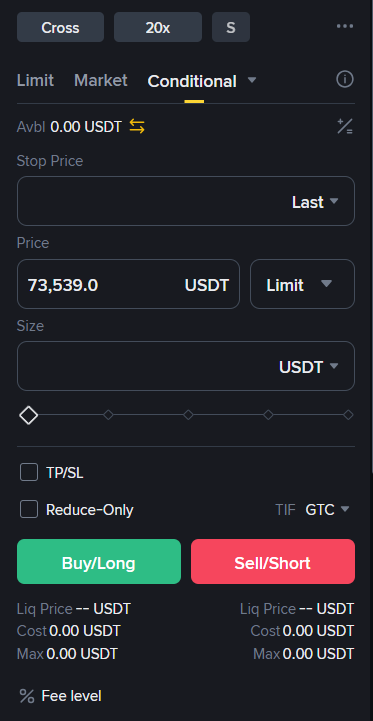
Crypto futures grant you the unique power to make money regardless of market direction.
1. Going Long (Buy Long)
If your technical indicators show that the crypto market is bullish and a price surge is imminent, you click [Buy Long]. You are buying the contract cheap to sell it at a premium later.
2. Going Short (Sell Short)
If you analyze the charts and expect a massive crash or market correction, you click [Sell Short]. This allows you to profit heavily as the price of the asset drops.
Market Orders vs. Limit Orders
- Limit Order: Your order will only trigger when the market reaches your exact designated price. This is cheaper in terms of taker fees.
- Market Order: Your order triggers instantly at the current best available market price. Use this only when you need to capture a sudden breakout immediately.
Step 5: Advanced Risk Management (TP/SL)
The difference between a successful trader and a gambler is a strict exit strategy. Binance allows you to toggle the [TP/SL] checkbox before opening your position.
- Take Profit (TP): Automatically cashes out your position at a set target price to lock in your hard-earned gains.
- Stop Loss (SL): Automatically cuts your trade if the market moves against your prediction, completely preventing forced liquidation.
Conclusion: Build Your Trading Pipeline Safely
Executing trades on the world’s largest derivatives platform is highly rewarding if done with discipline. By following this comprehensive Binance Futures Trading Guide, you have the basic blueprint to trade crypto safely. Always utilize Isolated margin, keep your leverage low, and protect every single trade with a strict Stop Loss.
If you haven’t deposited any assets into your main account yet, make sure to read our ultimate [Crypto Deposit Guide] to get started seamlessly.