
If you want to accelerate your crypto earnings, learning how to trade derivatives via this Bitget Futures Trading Guide is one of the smartest moves you can make. Bitget has rapidly evolved into a top-tier global derivatives platform, famous for its deep liquidity, low fees, and revolutionary copy trading ecosystem.
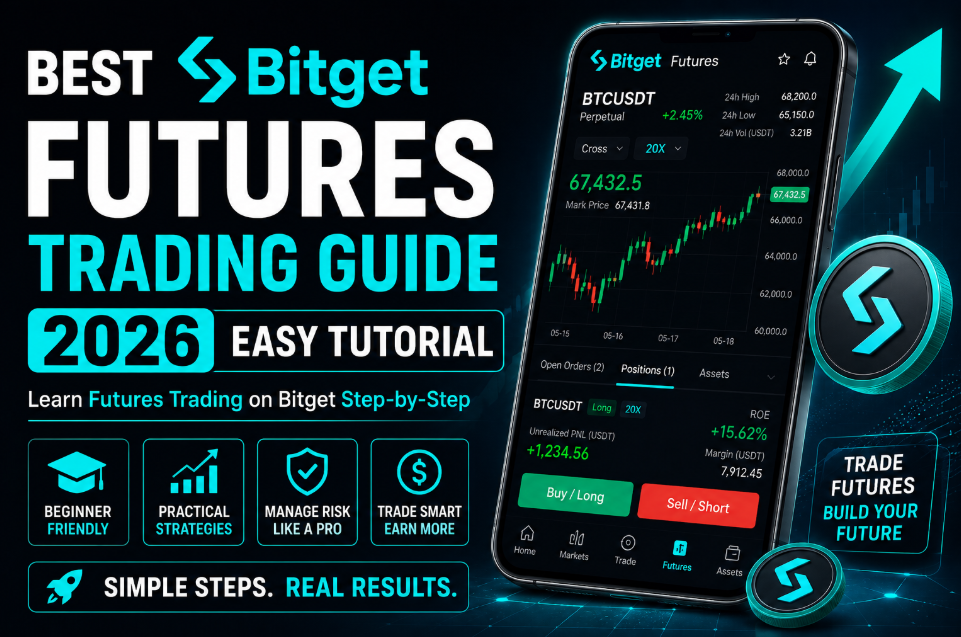
Trading crypto futures allows you to go long or short with leverage, significantly multiplying your trading efficiency. However, without a structural blueprint, leverage can dissolve your capital instantly. This comprehensive Bitget Futures Trading Guide will walk you through funding, margin setups, and opening positions safely.
🎁 Exclusive Offer: If you are new to the platform, register today through our official [Bitget Registration Link] to unlock exclusive welcome rewards and secure an instant 20% lifetime discount on trading fees!
Why Trade Derivatives on Bitget?
Bitget is a heavy hitter in the crypto space, especially favored by retail traders who value cutting-edge trading tools and smooth interface performance during peak market hours.
Strategic Advantages of Bitget Futures Market
| Feature | Benefit for Traders |
| Advanced Copy Trading | Automatically replicate the positions of elite elite traders. |
| Highly Competitive Fees | Enjoy some of the lowest maker and taker fees in the industry. |
| Impeccable Security | Confirmed 100% Proof of Reserves (PoR) protecting user data. |
| Dynamic Order Interface | Lightning-fast order routing system with zero latency. |
Step 1: Funding Your Bitget Futures Account
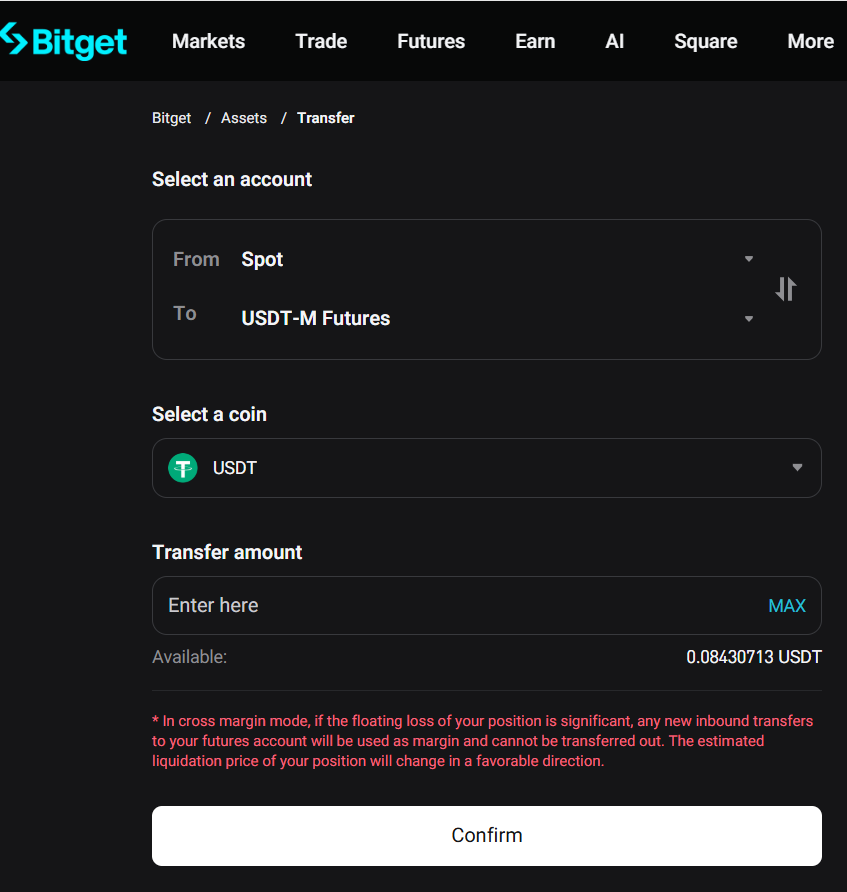
To open a position, you must ensure that your collateral stablecoins are located in your specific derivatives wallet.
- Log In or Sign Up: Securely log in to your Bitget portal. If you do not have an account yet, utilize the official [Bitget Registration Link] to claim your fee discounts before moving any capital.
- Access Your Wallet: Navigate to “Assets” in the top right, then select “Futures Account”.
- Internal Transfer: Click [Transfer]. Move your USDT or USDC from your Spot wallet into your USDT-M Futures account. Bitget never charges internal processing fees for moving your own capital.
Step 2: Selecting Margin Mode: Cross vs. Isolated
Once your futures wallet is funded, go to the top navigation bar, click on [Futures], and choose [USDT-M Futures]. Select a pair like BTCUSDT. Your very first critical decision on the right-hand panel is selecting your margin configuration. This Bitget Futures Trading Guide heavily emphasizes getting this step right.
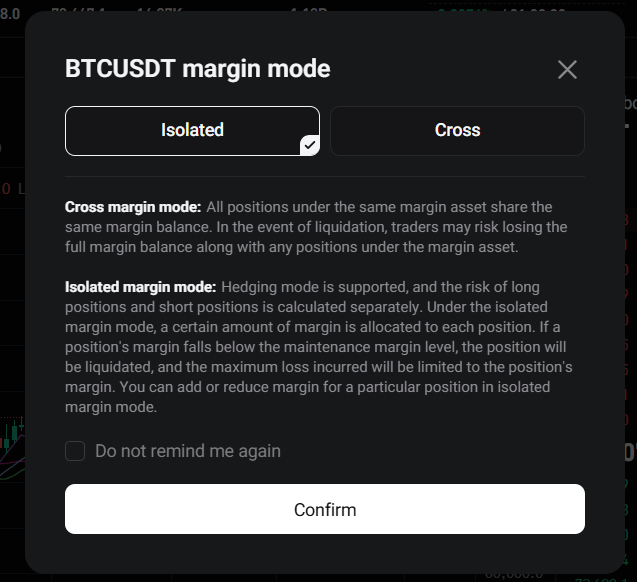
- Cross Margin Mode: Positions leverage the entire net balance of your futures wallet. This lowers the probability of liquidation but risks your total account balance if a market flash crash occurs.
- Isolated Margin Mode: This isolates your risk entirely. The margin assigned to a single trade is the absolute maximum amount you can lose. For all beginners studying this Bitget Futures Trading Guide, we strictly advise utilizing Isolated Margin.
Step 3: Determining Your Leverage Safely
Leverage allows you to amplify your exposure. Using 5x leverage means a $200 position lets you control $1,000 worth of Bitcoin.
Bitget offers massive leverage options up to 125x on premium assets. However, high leverage shrinks your liquidation safety net. To ensure sustainable, long-term profitability, maintain your leverage between 2x and 5x. Capital preservation is always your number one priority.
Step 4: Executing a Long vs. Short Position
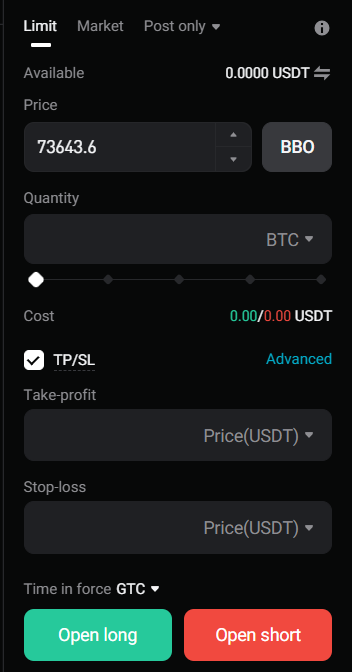
Crypto futures grant you the ultimate flexibility to generate revenue regardless of whether the market goes up or crashes.
1. Opening a Long Position (Buy Long)
If your charts suggest that the asset is heavily oversold and ready to pump, you enter a Long position. You profit as the price moves upward.
2. Opening a Short Position (Sell Short)
If you anticipate a correction or a bearish trend, you enter a Short position. You are selling the asset high with the strategy of buying it back cheaper, banking the difference as profit.
Market Orders vs. Limit Orders
- Limit Order: Triggers only when the market hits your precise price target, maximizing your fee efficiency.
- Market Order: Fills immediately at the prevailing market price. Excellent for chasing rapid momentum but features higher taker fees.
Step 5: Implementing Take Profit and Stop Loss (TP/SL)
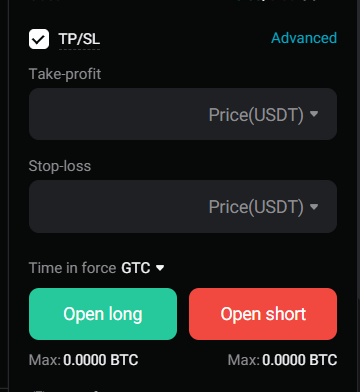
A trade without an automated exit strategy is a guaranteed loss over time. Bitget provides an integrated [TP/SL] toggle within the order box.
- Take Profit (TP): Secures your earnings automatically once the market touches your profit destination.
- Stop Loss (SL): Instantly cuts the trade if the asset trends against your thesis, saving you from devastating liquidation events.
Conclusion: Trade Disciplined, Grow Consistently
Trading crypto derivatives on Bitget offers exceptional financial leverage if you master risk control. Following this step-by-step Bitget Futures Trading Guide gives you the perfect operational framework. Start with low leverage, utilize isolated positions, and never trade without a Stop Loss active.
If you still need to transfer crypto into your exchange from an external source, make sure to read our ultimate [Crypto Deposit Guide] to avoid any critical deposit mistakes.